



MAI Image

MAI Image 2.7 Edit and create photos online

Relight, restyle or fix the text in a photo with MAI Image 2.7, or create one from text.

MAI Image 2.7 is the image model Microsoft released on November 17, 2026, after previewing it as an editing model in October. Upload up to five photos and describe the change: new light, a new style, different words on a sign or label, an object swapped or moved, a blurry shot cleaned up. It also makes pictures from a prompt. Choose 1K or 2K and one of seven aspect ratios; your sign-up credits cover a first picture.

  • Up to 5 photos per edit
  • Relight, restyle, fix text
  • 1K or 2K, 7 aspect ratios
  • Free to try with sign-up credits
0
The candle moved onto a bath tray over a clawfoot tub
Prompt

Move this candle into a new scene: it stands on a wooden bath tray laid across a filled white clawfoot bathtub, next to a folded linen towel and a sprig of eucalyptus, with soft daylight from a frosted window. Keep the jar, its label and its proportions exactly the same.

MAI Image 2.7 examples

  • MAI-Image-2.7

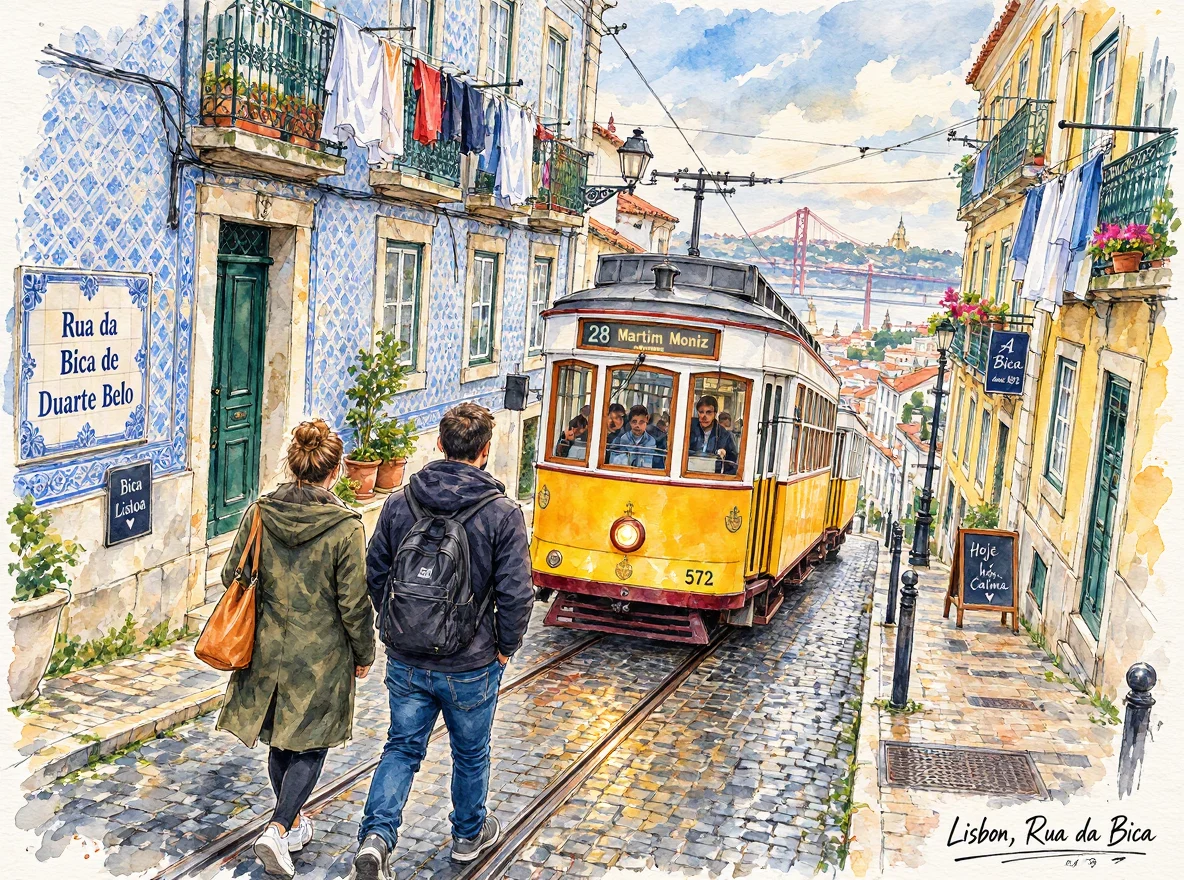
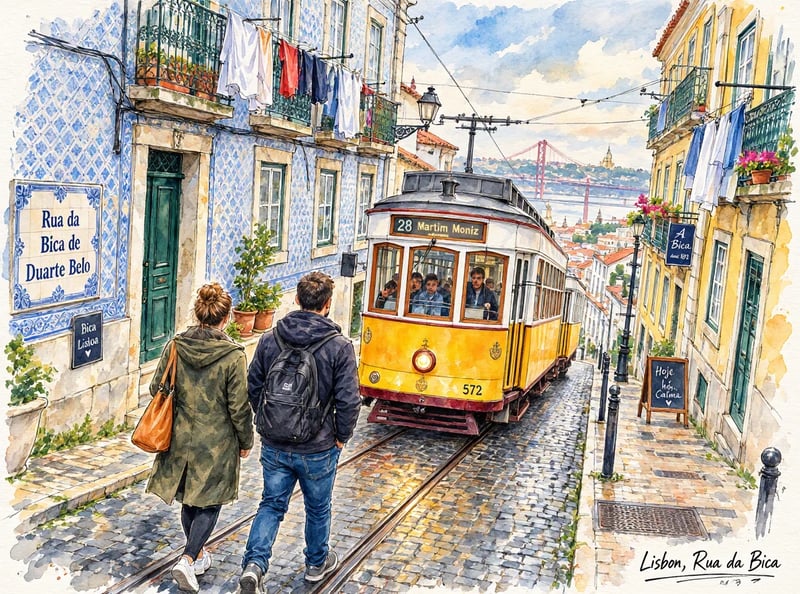
    Turn this photo into a loose watercolor sketch for a travel journal: fine ink outlines, soft washes of color, white paper showing through at the edges, and a handwritten caption 'Lisbon, Rua da Bica' in the bottom corner. Keep the same composition, the tram and the buildings.

  • MAI-Image-2.7 Flash

    Relight this photo as a cozy evening scene: the candle is lit with a small steady flame, warm lamplight comes from the left, soft shadows fall across the counter and the background turns dim and warm. Keep the jar, its label and the counter exactly as they are.

  • MAI-Image-2.7

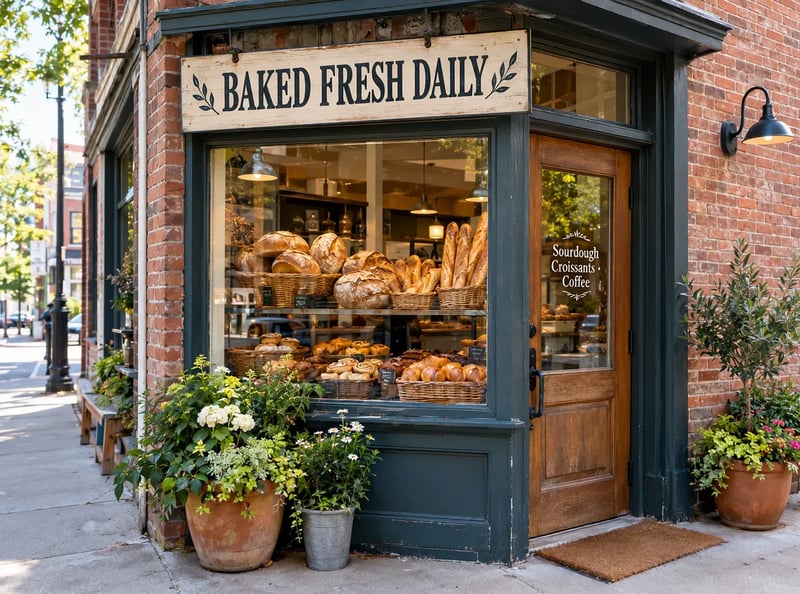
    Change the wooden sign above the window so it reads 'BAKED FRESH DAILY' in the same carved serif letters with the same leaf ornaments, and change the small sign on the door to 'Sourdough · Croissants · Coffee'. Keep everything else exactly the same.

  • MAI-Image-2.7 Flash

    Change the wooden sign above the window so it reads 'BAKED FRESH DAILY' in the same carved serif letters with the same leaf ornaments, and change the small sign on the door to 'Sourdough · Croissants · Coffee'. Keep everything else exactly the same.

  • MAI-Image-2.7

    Replace the gray sofa with a deep green velvet sofa of the same size, in the same place, with the same cushions and throw blanket on it. Keep the room, the light and everything else unchanged.

Edited on this site

MAI Image 2.7 edits: before and after

Four MAI Image 2.7 edits we made at 1K on November 18, 2026, covering four of the kinds of change Microsoft names, from relighting to swapping an object. Each is the first result we got, back in 30 to 41 seconds, shown with the exact prompt. Hold the button on a result to see the photo it started from.

The same candle lit with a small flame in warm, dim evening light on the same counter, edited with MAI Image 2.7
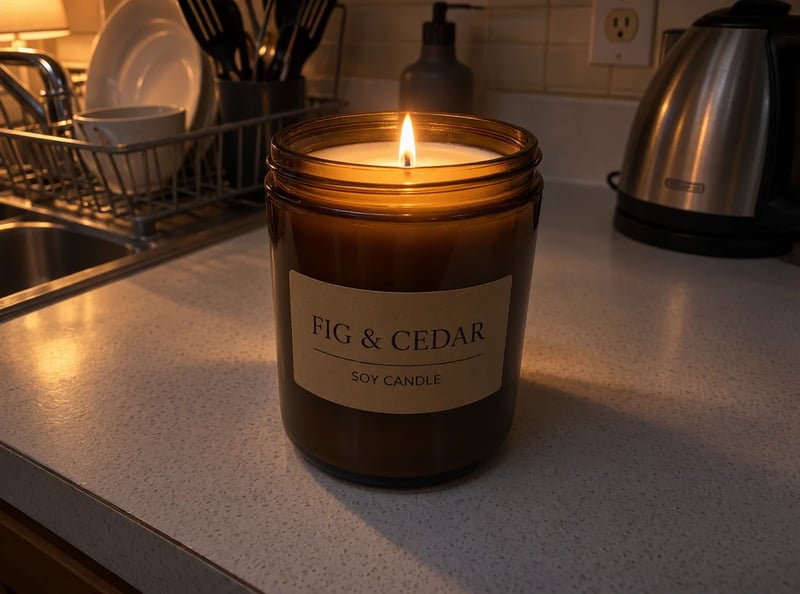
Flat-lit product shot of an amber jar candle labeled FIG & CEDAR on a white kitchen counter under flat overhead light
Original photo
ModelMAI Image 2.7
Prompt

Relight this photo as a cozy evening scene: the candle is lit with a small steady flame, warm lamplight comes from the left, soft shadows fall across the counter and the background turns dim and warm. Keep the jar, its label and the counter exactly as they are.

  • Kept: The jar, the FIG & CEDAR label, the dish rack and the kettle stayed exactly where they were.
  • Worth checking: The whole kitchen went darker than the prompt's lamplight suggests. Ask for a brighter key light on the product if the label has to read clearly in a listing.

Say where the new light comes from and what the background should do.
Edit your photo

What's new in MAI Image 2.7

Microsoft MAI Image 2.7 is the newest image model from Microsoft AI, and its story has two dates. On October 27, 2026, Microsoft previewed it as an editing model on Arena, Artificial Analysis and its MAI Playground, with text to image listed as coming soon. On November 17, 2026, it released MAI Image 2.7 together with MAI Image 2.7 Flash, with both text to image and editing, in Microsoft Foundry's public preview, in its MAI Labs app and on partner platforms. Articles written between those dates often say the model only edits and has no API; that is out of date.

Against MAI Image 2.6, released on September 4, 2026, the plainest change is size: MAI Image 2.6 topped out at 1.5K, while MAI Image 2.7 goes up to 2048 × 2048. Microsoft reports that in October, 2.7 improved on 2.6 in every use case and editing action Artificial Analysis tested, and that as of November 16, 2026, it ranked first on Artificial Analysis' image editing leaderboard with 1,215 Elo.

Microsoft puts editing first. MAI Image 2.7 can remove or replace objects, change an object's color, material or position without disturbing the rest, update text and symbols so they sit in the scene, relight or restyle a whole picture, and restore older or motion-blurred photos, while keeping the layout steady over repeated edits. It also renders readable text on labels, posters, packaging and signs, and handles photoreal light, reflections and portraits.

Microsoft: Introducing MAI Image 2.7

Text to image

Create images from text with MAI Image 2.7

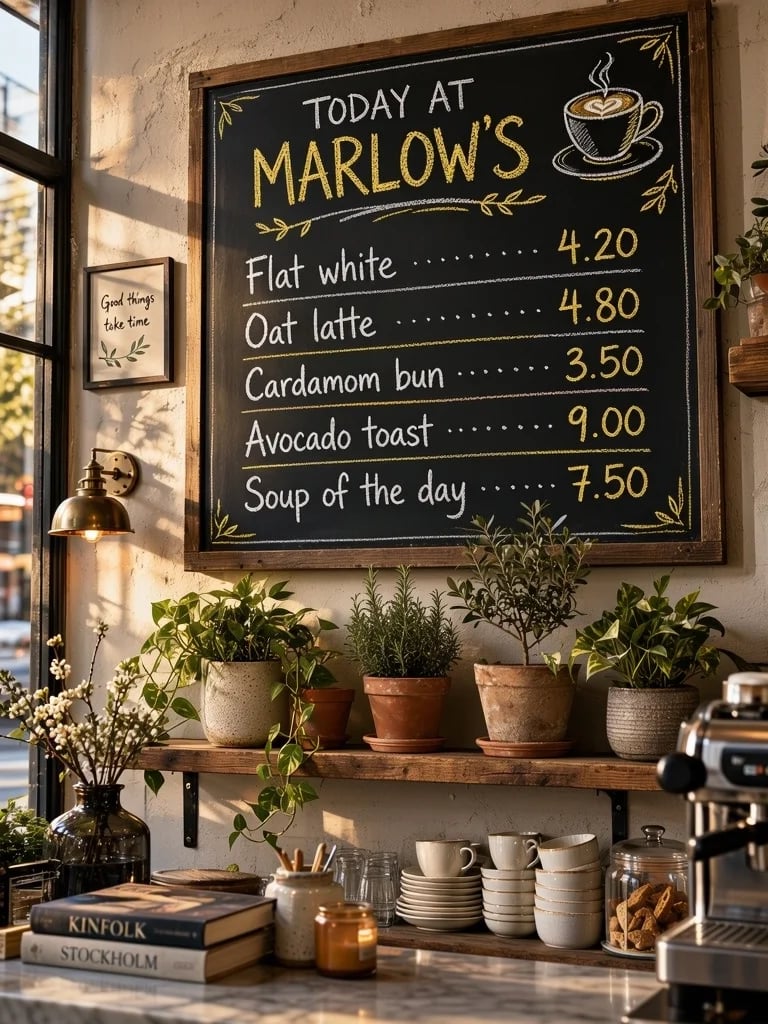
Two text-heavy MAI Image 2.7 pictures we made at 1K on November 18, 2026, each the first result and back in 34 seconds. Every price on the menu and every word of the ingredient line came out as written. The model also added a framed note and book titles in the café and orange slices beside the serum, which the prompts did not ask for.

Chalkboard menu titled TODAY AT MARLOW'S listing Flat white 4.20, Oat latte 4.80, Cardamom bun 3.50, Avocado toast 9.00 and Soup of the day 7.50 above a shelf of plants, made with MAI Image 2.7

Café menu board

  • 3:4

Prompt

A chalkboard menu on the wall of a small neighborhood café, hand-lettered in white and yellow chalk. Title 'TODAY AT MARLOW'S'. Items with prices: 'Flat white 4.20', 'Oat latte 4.80', 'Cardamom bun 3.50', 'Avocado toast 9.00', 'Soup of the day 7.50'. A small chalk drawing of a coffee cup in one corner, a shelf of plants below the board, warm afternoon light.

Compare versions

MAI Image 2.7 vs MAI Image 2.6 and 2.7 Flash

Facts from Microsoft's announcements and from this site's generator. MAI Image 2.6 is shown for reference; this site runs the two 2.7 models.

NewestMAI Image 2.7Finest detail and polished editsEdit with MAI Image 2.7MAI Image 2.7 FlashBuilt for speed and lower costTry MAI Image 2.7 FlashMAI Image 2.6The previous version
ReleasedNovember 17, 2026November 17, 2026September 4, 2026
Text to imageYesYes—
Photo editingYes, up to 5 photos hereYes, up to 5 photos here—
Largest size2048 × 2048 at 2K here2048 × 2048 at 2K here1.5K
Artificial Analysis image editing#1, 1,215 Elo (Microsoft, as of Nov 16, 2026)Not reportedBehind 2.7 in every editing action tested (Microsoft, Oct 2026)
Credits per picture here7 at 1K, 30 at 2K3 at 1K, 9 at 2KNot on this site
Photo editsA few credits more per uploaded photo, shown before you startA few credits more per uploaded photo, shown before you startNot on this site
How it works

How to edit a photo with MAI Image 2.7

  1. 1

    Upload up to 5 photos

    In the generator above, add one to five photos. Use more than one when the result should combine them, such as a product and the room it belongs in.

  2. 2

    Describe the change

    Say what should change and what has to stay, in plain sentences. Put new words in quotes, and say where the light comes from or where an object goes.

  3. 3

    Pick ratio and size, then create

    Choose the aspect ratio you want the result in and 1K or 2K, then create. Check the parts you asked to keep before you download, and rerun with one changed line if something slipped.

Pricing

MAI Image 2.7 pricing

Plans and credit packs add credits to your account. A MAI Image 2.7 picture costs 7 credits at 1K and 30 at 2K, and each photo you upload to edit adds a little more. The generator shows the total before you start.

Black Friday50% OFF
Ends Nov 30--days--hrs--min--sec
  • Up to 333 images or 41 videos

    • All models, including Premium
  • Up to 833 images or 104 videos

    • All models, including Premium
  • Up to 2,500 images or 312 videos

    • All models, including Premium

· No card required

Failed runs are refunded automatically · Cancel anytime

FAQ

MAI Image 2.7 questions