

MAI Image

MAI Image 2.7 Flash Fast, low-cost image generator

Make quick drafts or edit up to 5 photos with MAI Image 2.7 Flash, free to try.

MAI Image 2.7 Flash is the optimized version of MAI Image 2.7 that Microsoft built for speed and lower cost; it came out with 2.7 on November 17, 2026. It makes pictures from a prompt and edits up to five photos, at 1K or 2K in seven aspect ratios, for a lower price than 2.7. Use it to test prompts, draft social posts or try many versions, then switch to 2.7 for the finest detail.

  • Built for speed and lower cost
  • Text to image and photo edits
  • Up to 5 photos per edit
  • 1K or 2K, 7 aspect ratios
0
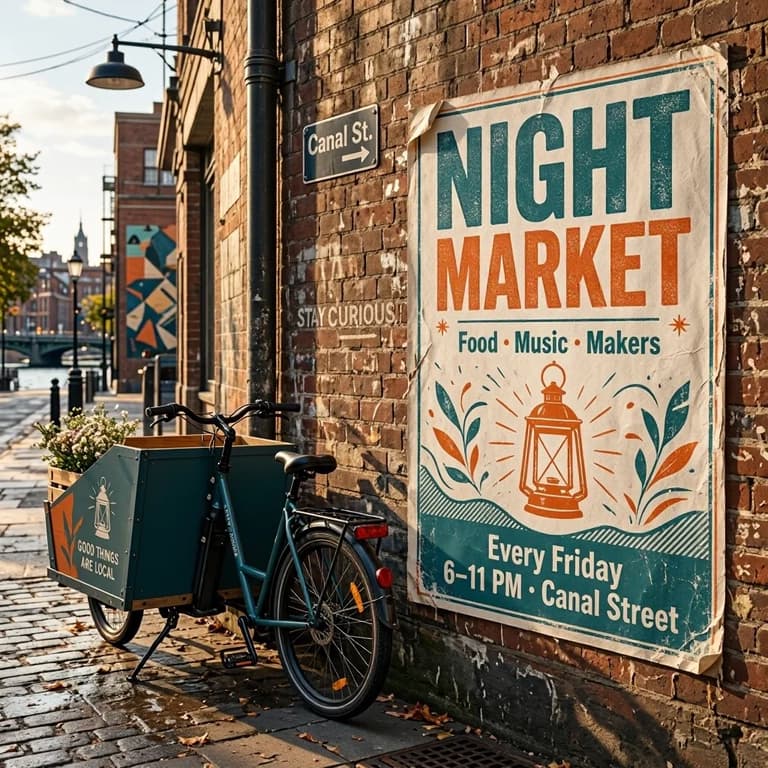
NIGHT MARKET poster beside a teal cargo bike
Prompt

A paper poster pasted on a brick wall in a city side street, slightly weathered at the edges. Big headline 'NIGHT MARKET', subtitle 'Food · Music · Makers', and the line 'Every Friday 6–11 PM · Canal Street'. Bold two-color screen-print style in teal and orange with a simple lantern illustration, a parked cargo bike beside the wall, late afternoon daylight.

MAI Image 2.7 Flash examples

  • MAI-Image-2.7

    A bag of single-origin coffee beans from a small roastery, standing on a worn butcher-block counter next to a brass scoop of beans. The kraft paper label reads 'HILLSIDE ROASTERS' at the top, 'Huila, Colombia · Washed' in the middle and 'Notes: cherry, cocoa, brown sugar' below, in a clean serif typeface. Soft morning light from the left, shallow depth of field, shot like a product listing photo.

  • MAI-Image-2.7 Flash

    A bag of single-origin coffee beans from a small roastery, standing on a worn butcher-block counter next to a brass scoop of beans. The kraft paper label reads 'HILLSIDE ROASTERS' at the top, 'Huila, Colombia · Washed' in the middle and 'Notes: cherry, cocoa, brown sugar' below, in a clean serif typeface. Soft morning light from the left, shallow depth of field, shot like a product listing photo.

  • MAI-Image-2.7

    Portrait of a 62-year-old potter with a long gray braid and a clay-spattered linen apron, sitting at her wheel in a cluttered studio, hands resting on a half-thrown bowl. Cool north window light from the right, shelves of unglazed pots behind her, visible skin texture and fine wrinkles, a calm, amused expression, shot on a 50mm lens.

  • MAI-Image-2.7 Flash

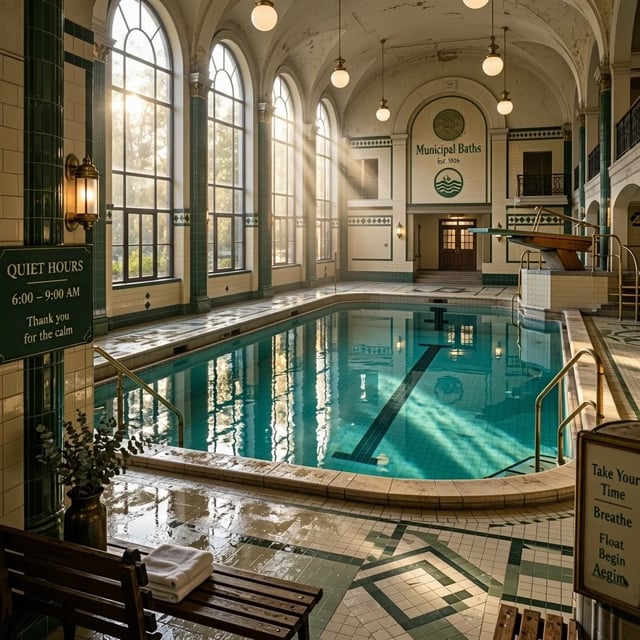
    Inside an old public bathhouse with an empty indoor swimming pool: still turquoise water, cream and green tiled walls, tall arched windows letting in beams of hazy light that reflect on the water and on the wet tile floor, brass handrails and a wooden diving board, cinematic wide shot, quiet early-morning atmosphere.

  • MAI-Image-2.7

    A paper poster pasted on a brick wall in a city side street, slightly weathered at the edges. Big headline 'NIGHT MARKET', subtitle 'Food · Music · Makers', and the line 'Every Friday 6–11 PM · Canal Street'. Bold two-color screen-print style in teal and orange with a simple lantern illustration, a parked cargo bike beside the wall, late afternoon daylight.

  • MAI-Image-2.7 Flash

    Portrait of a 62-year-old potter with a long gray braid and a clay-spattered linen apron, sitting at her wheel in a cluttered studio, hands resting on a half-thrown bowl. Cool north window light from the right, shelves of unglazed pots behind her, visible skin texture and fine wrinkles, a calm, amused expression, shot on a 50mm lens.

  • MAI-Image-2.7

    A chalkboard menu on the wall of a small neighborhood café, hand-lettered in white and yellow chalk. Title 'TODAY AT MARLOW'S'. Items with prices: 'Flat white 4.20', 'Oat latte 4.80', 'Cardamom bun 3.50', 'Avocado toast 9.00', 'Soup of the day 7.50'. A small chalk drawing of a coffee cup in one corner, a shelf of plants below the board, warm afternoon light.

Same prompt, both models

MAI Image 2.7 Flash vs MAI Image 2.7: same prompts

We ran the same four prompts on MAI Image 2.7 Flash and MAI Image 2.7 at 1K on November 18, 2026 and kept the first result of each. The Flash pictures came back in 18 to 23 seconds, the 2.7 pictures in 34 to 41. Both spelled every word we asked for correctly; the differences are in light, fine detail and the extras each model adds on its own.

Same prompt for both models

A bag of single-origin coffee beans from a small roastery, standing on a worn butcher-block counter next to a brass scoop of beans. The kraft paper label reads 'HILLSIDE ROASTERS' at the top, 'Huila, Colombia · Washed' in the middle and 'Notes: cherry, cocoa, brown sugar' below, in a clean serif typeface. Soft morning light from the left, shallow depth of field, shot like a product listing photo.

Read the three label lines, then compare the kraft paper, the beans and what each model put around the bag.

  • MAI Image 2.7 Flash

    1K · 18 s

    All three label lines right, set in an arched label with a mountain drawing. The table is warmer and more styled, with a chalkboard and titled books behind.

  • MAI Image 2.7

    1K · 34 s

    All three label lines right, plus an extra 'Small batch' line it wrote itself. Crisper kraft texture and beans, and more props with words on them.

Uses

When to use MAI Image 2.7 Flash

Microsoft shipped a MAI Image Flash model alongside both MAI Image 2.6 and 2.7, for work where speed and price count more than the last bit of detail. On our prompts, MAI Image 2.7 Flash answered in 18 to 23 seconds, against 34 to 41 for 2.7.

  • 01

    Prompt tests and drafts

    Try a prompt three or four ways on Flash, keep the wording that works, then run the final version on MAI Image 2.7.

  • 02

    Social posts and thumbnails

    Posts, story frames and video thumbnails are seen small and replaced often, so a quick picture at 1K usually does the job.

  • 03

    Many product variations

    Make the same product in several colors, settings or seasons, or edit one photo several ways, before you pick the ones worth finishing.

  • 04

    When to switch to MAI Image 2.7

    Switch for close-up portraits, dense small text and pictures you will print or publish, where finer texture and light matter.

Flash edits

Edit photos with MAI Image 2.7 Flash

MAI Image 2.7 Flash edits photos the same way as MAI Image 2.7. We gave it two of the photos and prompts used on the MAI Image 2.7 page at 1K on November 18, 2026; each edit came back in 22 to 24 seconds. Hold the button on a result to see the original.

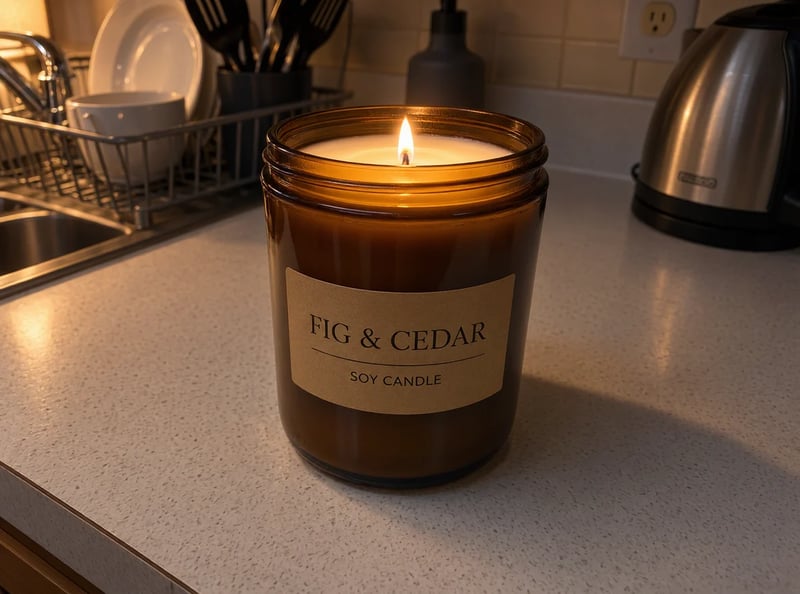
The same candle lit with a small flame in warm evening light, edited with MAI Image 2.7 Flash
Flat-lit product shot of an amber jar candle labeled FIG & CEDAR on a white kitchen counter under flat light
Original photo
ModelMAI Image 2.7 Flash
Prompt

Relight this photo as a cozy evening scene: the candle is lit with a small steady flame, warm lamplight comes from the left, soft shadows fall across the counter and the background turns dim and warm. Keep the jar, its label and the counter exactly as they are.

  • Kept: The jar, the label, the dish rack and the kettle stayed in place.
  • Worth checking: The kitchen stays a little brighter than in the MAI Image 2.7 edit, so the evening mood is lighter.

If the mood should be darker, say how dark the background gets.
Quick facts

MAI Image 2.7 Flash at a glance

What Microsoft has published about MAI Image 2.7 Flash, what you get here, and what we measured.

Made by
Microsoft AI
Released
November 17, 2026, with MAI Image 2.7
What it is
The optimized version of MAI Image 2.7
Microsoft built it for fast, cost-efficient generation.
What it does
Text to image and photo editing
Photos per edit
Up to 5
Sizes here
1K or 2K
Aspect ratios
7: 1:1, 4:3, 3:4, 3:2, 2:3, 16:9, 9:16
Output
One PNG per run
Time in our runs
18 to 24 seconds at 1K
Six Flash runs on November 18, 2026; MAI Image 2.7 took 30 to 41 seconds on the same jobs.
Free to try
Yes, with sign-up credits
Pictures made with free credits carry a watermark.
Commercial use
With a paid plan or credit pack
Pictures made on a paid plan or with a credit pack can be used commercially; pictures made only with free credits are for personal use.
How it works

How to use MAI Image 2.7 Flash

  1. 1

    Pick 2.7 Flash

    The generator above opens on MAI Image 2.7 Flash. Switch to MAI Image 2.7 in the same menu when you want the finer version.

  2. 2

    Write a prompt or upload photos

    Describe the picture and put any words in quotes, or upload one to five photos and say what to change and what to keep.

  3. 3

    Choose ratio and size, then create

    Pick one of seven aspect ratios and 1K or 2K, then create. Run a few versions, keep the best and finish it on MAI Image 2.7 if it needs more detail.

Pricing

MAI Image 2.7 Flash pricing

Plans and credit packs add credits to your account. A MAI Image 2.7 Flash picture costs 3 credits at 1K and 9 at 2K, against 7 and 30 for MAI Image 2.7. Each photo you upload to edit adds a little more, and the generator shows the total before you start.

Black Friday50% OFF
Ends Nov 30--days--hrs--min--sec
  • Up to 333 images or 41 videos

    • All models, including Premium
  • Up to 833 images or 104 videos

    • All models, including Premium
  • Up to 2,500 images or 312 videos

    • All models, including Premium

· No card required

Failed runs are refunded automatically · Cancel anytime

FAQ

MAI Image 2.7 Flash questions